How To Connect ESewa Payment Solutions With The WHMCS Platform
You can easily integrate eSewa Payment gateway solution with the WHMCS platform using "The eSewa Payment Gateway module".
This eSewa module allows you to make a direct payment for different services ( domain registration, hosting, SSL certificates, and other items) through the website. The payment directly goes to the merchant account.
This is a great platform for merchant companies in Nepal that need to receive payment from their clients. You can make a payment while buying a new service and for the service renewal.
The advantage of having eSewa Payment Gateway module for WHMCS
This eSewa Payment Gateway module for WHMCS helps the merchant to receive the payment directly from the customer through eSewa. Some of the pros of having this payment module are:
⇒ The merchant only needs to add the "secret Key/ Merchant ID" in the module. The ID is will be provided by eSewa
⇒ After the configuration, the merchant can publically receive payments from the user through the website.
⇒ If you have made an additional payment then your remaining balance ( after clearing the current bill) will be added to your WHMCS account as a credit. You can use this balance in the future.
⇒ If the paid amount is less than the actual amount required, the payment will be confirmed by eSewa end. However, the invoice will only be cleared when the user completes the payment via eSewa.
⇒ The user receives an email notification after the merchant receives an eSewa payment with details like date of payment, amount, description, transaction ID, etc.
⇒ Merchant can view the details of the client on the client billing section in WHMCS
⇒ In this module of payment, the merchant can also accept payment in advance which later can be credited to the customer. This will let the customer make a new purchase in the future.
Installation Guide
In the modules/gateways folder inside your WHMCS installation, there is a file “Esewa-Module-for-whmcs_zip”. Unzip or extract this file.
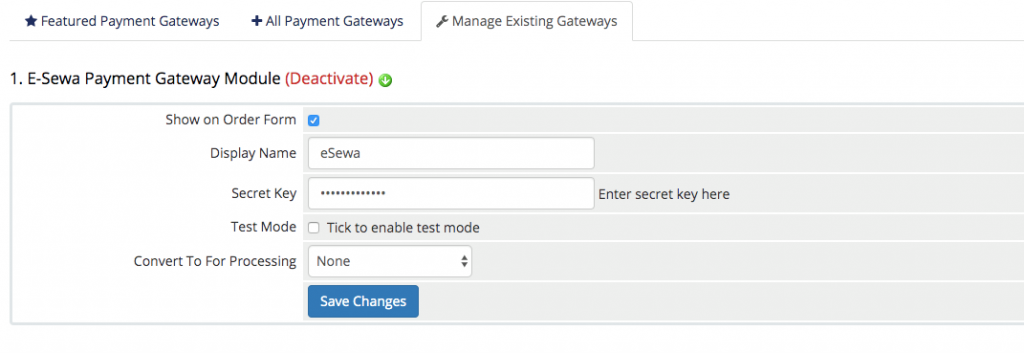
⇒ GoTo (Setup -> Payments -> Payment Gateways -> All Payment Gateways). This will activate the eSewa module in your WHMCS admin panel.
⇒ GoTo “Esewa” and click it.
⇒ GoTo eSewa dashboard ->merchant . Copy the merchant ID/secret key from the account. Add this to the related fields at the module setup page on WHMCS.
⇒ Click on “Save Changes” in your WHMCS.
How to Test the new installation
Go to the official website of eSewa and enable the service test mode. This will help you test the newly installed module.
Before you go live, remember to change the secret key with the merchant key that you received from the eSewa officials.

For more details, dial +977-9845185260 or +977-9802075711 or email us at [email protected] or [email protected]
E-Sewa Payment Gateway Module for WHMCS
Order our eSewa payment Gateway module for WHMCS and accept payment from your client directly via eSewa. Easy integration and instant activation.